


Podcast Player
4.833.48K Reviews
App Specs
- Version
- 9.16.1-251202123
- Updated On
- License
- Free
- Downloads
- 10,000,000+
- Developer
- Castbox.FM - Radio & Podcast & AudioBooks
- Categories
- News & Magazines
- Platform
- Android, iOS
Screenshots
 Analysis by AppCompare
I tend to notice a podcast app’s value most when someone else in the house wants to use the same phone or tablet. One person may want the news over breakfast, while another is trying to pick up an audiobook later. Podcast Player brings podcasts, audiobooks, and radio into one listening space, which makes it handy for a mixed household—but sharing a device also makes it worth thinking about whose subscriptions, queues, and listening choices are being used.
One device, different listening habits
In a realistic morning routine, I might put on a news episode while making coffee, then hand the device to someone who wants music-free company during a chore. Having several kinds of spoken audio available in one app can reduce the need to switch between separate players. That convenience is strongest when people are happy to take turns and can agree on what is queued next.
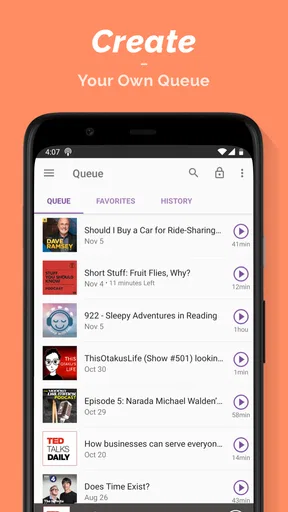
The trade-off is that a shared listening space can become cluttered quickly. If different people subscribe to shows or save episodes for different reasons, a queue that made sense yesterday may not suit the next listener. I’d treat playlists as intentional listening plans rather than as a household-wide catch-all: one for a commute, another for a long drive, or a short set of episodes for a particular subject. That small habit makes it easier to resume a plan without sorting through every saved item.
Set expectations before sharing
Before handing over a device, I’d agree on a few simple boundaries: whether the next person can change the queue, whether they can subscribe to a show, and whether saved episodes are for everyone or just the person who chose them. These are ordinary household agreements, not app controls, and they matter because the listening experience can feel personal even when the device is communal.
For example, someone who uses the app to follow current affairs may prefer not to have their recommendations shaped by a child’s stories or another adult’s comedy choices. If people have separate devices, using them separately is the cleaner option. If there is just one device, taking turns and keeping playlists clearly focused can help, though it won’t create a separate profile or listening history by itself.
Keeping a shared queue usable
Coordination is less about making a perfect library and more about avoiding small frustrations. I’d add only episodes that the next listener actually expects to hear, and I’d remove or move on from items once a shared listening session is finished. For a road trip, one person can prepare a themed playlist before setting off, while the passenger handles any changes. That is more practical than searching through subscriptions while the driver is on the road.
Offline listening can also be useful when several people are going somewhere with unreliable connectivity, but it needs a little planning: save the episodes you genuinely expect to play before leaving, rather than assuming every item in a queue is already available. A saved episode is useful for a commute or a trip, while a bookmark can help someone return to a particular moment without asking everyone to listen through the whole episode again.
Worth Reading Before You Choose

Flipboard Shows What News Apps Must Do Beyond the Feed

Switching to Android Auto Means Rethinking Your Driving Routine

Google Calendar Makes a Crowded Week Easier to Manage

Ludo King Makes the Most of the Minutes Between Plans

Baby Panda World Brings Quick Play to Modern Phones, but Its Game Library Feels Busy

ESPN’s Live Game View Makes Following Close Games Easier
Getting Started with Podcast Player
First things first, downloading Podcast Player is a breeze. It's available on both Android and iOS, which is super convenient. Once you get it installed, the app opens up with a clean, intuitive interface. I appreciated how it didn’t bombard me with too many options right off the bat. Instead, it gently nudged me to start exploring the content, which was quite refreshing.
Discovering New Content
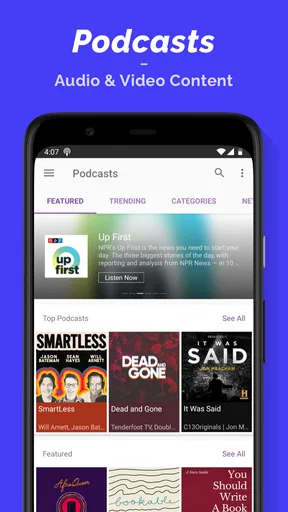
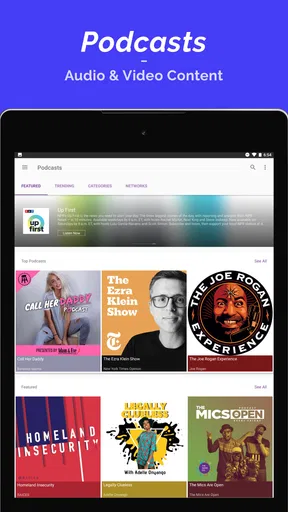
One of the standout features for me was the discovery section. The app offers a wide range of categories like technology, comedy, news, and more. I found myself diving into genres I didn't even know I was interested in! The recommendations are spot-on, thanks to its smart algorithm. I guess it’s safe to say my queue is now overflowing with episodes to catch up on.
They've also got this nifty feature where you can create playlists of your favorite episodes. This is perfect for long commutes or when you just want to have a themed binge-listening session. I made a playlist of all my favorite true-crime podcasts, and it was a hit during my last road trip.
User Experience and Features
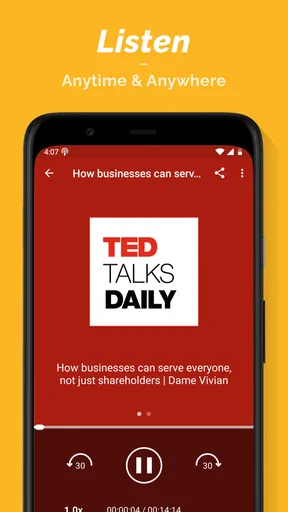
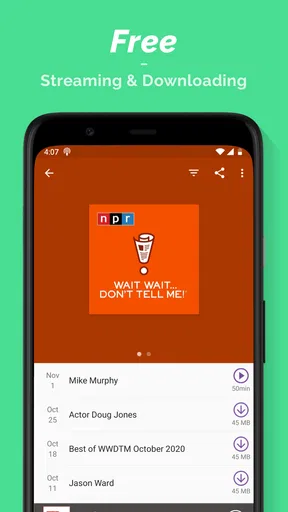
The playback features are another area where Podcast Player shines. You can adjust the playback speed, which is a lifesaver for those of us who like to power through content. There’s also a sleep timer for when you’re winding down at night, and you can save episodes for offline listening, a must-have for those data-conscious users.
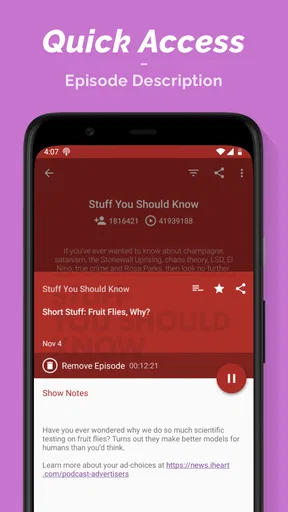
One thing I found particularly useful was the ability to bookmark specific segments of an episode. It’s perfect for those "aha" moments you want to revisit later. Plus, sharing episodes with friends is a breeze—just a couple of taps, and you’re good to go.
Working out who it suits
The app is developed by Castbox.FM - Radio & Podcast & AudioBooks, and its place in News & Magazines makes sense for listeners who want shows alongside other spoken-audio formats. It is free to install, with in-app purchases ranging from $1.99 to $14.99 per item. I’d start with the free experience and decide whether any paid option is worthwhile only after establishing a regular listening routine.
Its reach is substantial: it has over 10 million installs, a 4.8 average from around 303,000 ratings, and about 33,000 written reviews. Those figures suggest many people find it useful, but they don’t tell me whether its approach will fit a particular listener. I’d recommend it most to people who enjoy browsing, follow several shows, and appreciate keeping podcasts and other spoken audio together.
If you only listen to one or two podcasts and already have a player that handles them reliably, switching may not improve your day. A dedicated audiobook app may be a better fit if books are your main interest, while a service focused narrowly on radio may suit someone who mainly wants live stations. Podcast Player’s advantage is breadth; the compromise is that a broad listening library can ask for more organizing than a simple, single-purpose player.
Useful listening habits and real limits
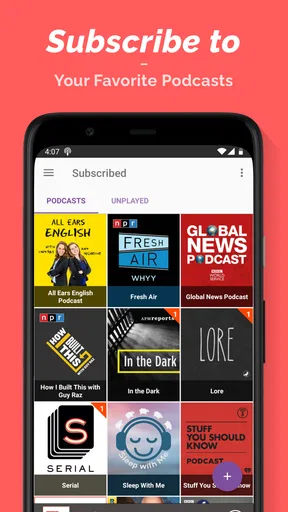
Discovery works best when I use it as a way to find a few promising shows, not as a reason to subscribe to everything that catches my eye. Otherwise, the queue becomes a backlog rather than a useful shortlist. I’d sample a show, decide whether I want to follow it, and reserve playlists for episodes I have a concrete reason to hear together. This keeps casual exploration from taking over the listening plan.
Playback speed is another setting worth using with care. A faster pace can help with a familiar interview or a routine news recap, but it can make dense reporting, language learning, or a carefully produced story harder to follow. I’d adjust it for the specific episode rather than treating one speed as a universal setting. The sleep timer serves a different purpose: it is helpful at bedtime when I don’t want an episode continuing all night, but it is not a substitute for choosing a stopping point when I need to remember what I heard.
Bookmarks are particularly useful for practical listening: I can mark a recipe instruction, a book recommendation, or a point I want to discuss later. They are less useful if I save every interesting moment without a way to remember why it mattered. A short personal note outside the app can make a bookmark easier to act on, especially when several people share the device and may not know why a segment was saved.
Age, trust, and choosing the right setup
The content rating is Teen, so I would not assume every show is appropriate for every younger listener simply because it appears in the same app. Podcasts and radio cover many subjects and tones; I’d help a younger person choose specific programs and listen to an episode together before treating a show as routine household listening. That is a more reliable approach than judging a series by its title or cover art alone.
The app runs on Android 6.0 or later and is currently at version 9.16.1-251202123. It was released on January 4, 2016, so it has had a long presence as a listening option, but I would still keep the app updated through the device’s normal store process. If someone in the household depends on a particular feature, I’d try that workflow on their own device before making it central to a shared routine.
For account boundaries, I’d avoid treating one shared account as if it were separate personal spaces. A person’s subscriptions and listening choices can become mixed when several people use the same setup, so a separate device is preferable when privacy or distinct recommendations matter. When that is not practical, clear turns, focused playlists, and a quick check of the queue before handing over the phone are low-effort ways to reduce confusion.
Final Thoughts
Overall, my experience with Podcast Player has been stellar. It’s user-friendly, packed with features, and makes discovering new content a joy. If you’re on the hunt for a comprehensive podcast app, this one should definitely be on your radar. Whether you're listening on your morning jog or winding down after a long day, this app has got you covered.
So, if you’re ready to dive into the podcasting world or just looking for a new app to enhance your listening experience, give Podcast Player a shot. You might just find your next favorite series!
My household verdict
For a household that shares a device and enjoys different kinds of spoken audio, I see Podcast Player as a capable common listening shelf, provided everyone is comfortable coordinating subscriptions and queues. It is especially appealing when one person wants to discover shows, another wants a prepared playlist for a trip, and someone else occasionally turns to an audiobook or radio. The bookmarks, speed controls, sleep timer, and offline saves each support a different moment in that routine, rather than being features I’d use in exactly the same way every time.
I would skip it as the household’s single shared solution if people need private listening histories, distinct personal recommendations, or firm separation between adult and younger listeners. In that situation, individual devices or a more focused player may be less confusing. For everyone else, my practical advice is to start with a few subscriptions, keep playlists purposeful, and decide together what belongs in the shared queue. That makes the app’s breadth feel useful instead of overwhelming.
Pros
- User-friendly interface with intuitive navigation.
- Wide variety of podcast genres available.
- Customizable playback speed settings.
- Offline listening for downloaded episodes.
- Seamless integration with smart speakers.
Cons
- Occasional ads can interrupt playback.
- Limited advanced search options.
- Some features require premium subscription.
- Syncing issues across multiple devices.
- No support for video podcasts.
FAQs for Podcast Player
What features does the Podcast Player app offer?
The Podcast Player app offers a variety of features including offline listening, customizable playlists, sleep timers, and speed controls. It also provides an easy-to-use interface with personalized recommendations based on your listening habits. Users can explore a vast library of podcasts across multiple genres, ensuring there's something for everyone.
Is the Podcast Player app free to use?
Yes, the Podcast Player app is available for free with basic features. However, it offers a premium version that includes additional features such as ad-free listening, enhanced audio quality, and early access to new episodes. Users can choose a subscription plan that suits their needs.
How can I download podcasts for offline listening?
To download podcasts for offline listening, simply find the episode you want to download and tap the download icon next to it. The episode will be saved to your device, allowing you to listen without an internet connection. This feature is especially useful for commuting or traveling.
Does the Podcast Player app support multiple devices?
Yes, the Podcast Player app supports multiple devices. You can sync your account across different devices, ensuring your listening history and playlists are always up-to-date. This means you can start listening on your phone and continue on your tablet or desktop seamlessly.
How can I discover new podcasts on the Podcast Player app?
The Podcast Player app offers several ways to discover new content. Users can explore curated lists, trending podcasts, and personalized recommendations based on their listening history. Additionally, the app's search function allows users to find specific podcasts or explore new genres effortlessly.


